
In This Article
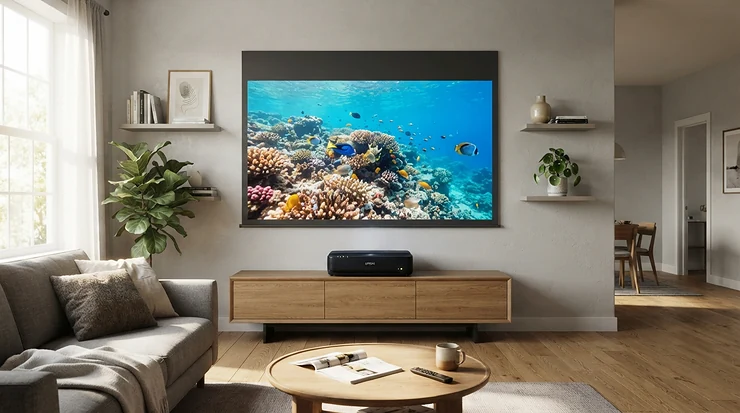
Picture this: you’ve got a bare wall, a Saturday night, and absolutely no desire to drill holes in the ceiling for a bracket that’ll gather dust anyway. That’s the entire pitch of the ultra short throw laser projector, and it’s a genuinely good one. Rather than beaming an image from the back of the room like a traditional projector, these units sit on a low unit or sideboard, just inches from the wall, and fire the picture upward at a steep angle to fill a screen the size of a small cinema.

So, what is an ultra short throw laser projector? In short, it’s a projector that sits within a few centimetres of your screen or wall — typically a throw ratio under 0.4:1 — and uses a laser light source instead of a traditional bulb, giving brighter, more colour-accurate 4K images with none of the lamp-replacement faff of older projectors.
This category has genuinely matured. Where early ultra short throw laser projector models struggled with soft edges and washed-out daytime pictures, 2026’s crop ships with triple-laser engines, proper smart platforms, and throw ratios tight enough to fill a 100-inch wall from barely 20cm away. We’ve dug through real specs, verified UK pricing, and pulled together honest, sourced review sentiment (not invented reviews) across seven genuine models — from sensible entry points to five-figure flagships — so you can work out which one actually earns a spot in your living room. For a proper technical grounding on throw ratios before you dive in, AVIXA’s short-throw ratio explainer is a solid primer.
Quick Comparison Table
| Projector | Throw Ratio | Brightness | Best For |
|---|---|---|---|
| Hisense PX1-Pro | 0.25:1 | 2,200 ANSI lumens | Budget entry point |
| XGIMI Aura 2 | ~0.24:1 | 2,300 ISO lumens | All-round value |
| Formovie Theater | 0.23:1 | 2,800 ANSI lumens | Colour accuracy on a budget |
| Hisense PX3-Pro | 0.22:1 | 3,000 ANSI lumens | Gaming and movies |
| Epson EH-LS800 | UST (sub-1in) | 4,000 lumens | Bright, daytime rooms |
| Samsung Premiere 9 | UST | 2,800 ANSI lumens | Built-in smart TV feel |
| LG HU915QE | 0.19:1 | 3,700 ANSI lumens | Flagship picture quality |
Looking at the spread here, the pattern is pretty clear: as throw ratio tightens and lumens climb, so does the price tag, but not in a straight line. The Hisense PX3-Pro punches well above its position thanks to genuine triple-laser tech at a mid-range price, while the Epson EH-LS800‘s 4,000-lumen output exists specifically to fight ambient light rather than chase the darkest possible blacks. If your room has big windows and no blackout curtains, brightness should outrank throw ratio on your priority list.
A little research now saves a returns headache later — scroll on before you commit to a screen size.
Top 7 Ultra Short Throw Laser Projectors: Expert Analysis
1. Hisense PX1-Pro — best budget entry into laser projection
Hisense’s PX1-Pro is the “try before you fully commit” option in this list, and it opens the standout feature straight away: a genuine tri-colour laser engine at a price that undercuts most of its rivals here by a four-figure margin. This UST projector sits below the flagship L9G and PX3-Pro models but still uses an RGB triple-laser light engine that skips the colour wheel found in cheaper single-chip DLP projectors, delivering 107% of the Rec.2020 colour gamut.
The light engine is rated at 2,200 ANSI lumens with a 25,000-hour lifespan, and its fixed 0.25:1 throw ratio supports 90 to 130-inch images from around 25 inches off the wall at 100 inches. In practice, that brightness figure means the PX1-Pro is happiest with the curtains at least partially drawn — it’s a dark-room performer first, bright-room compromiser second. Reviewers consistently flag it as excellent value for renters or space-constrained buyers who want the format without flagship spend.
Aggregated review sentiment is broadly positive on value and ease of setup, though testers have noted that automatic geometric setup could be improved and that it really needs an ALR screen for optimal performance rather than a bare wall.
Pros:
- ✅ Genuine tri-laser colour engine at an entry-level price
- ✅ Crisp UHD images with vivid, accurate colour
- ✅ Simple, fuss-free one-box UST design
Cons:
- ❌ Limited HDMI provision restricts connected devices
- ❌ Needs an ALR screen to really shine
At around £1,699-£1,999, the Hisense PX1-Pro is the projector I’d point a first-timer towards — it proves the laser-UST format works without asking you to remortgage the sofa.
2. XGIMI Aura 2 — best all-rounder for a serious home cinema
The Aura 2 is XGIMI’s follow-up to the projector that arguably put affordable UST laser TVs on the map, and it leads with genuinely improved brightness over its predecessor. It’s a premium ultra short-throw 4K projector using Dual Light 2.0 technology, which combines laser and LED light sources to deliver bright, colourful, contrast-rich images, and is capable of projecting up to 150 inches. Xgimi claims 2,300 ISO lumens of brightness compared to the original Aura’s 1,800.
What that means day-to-day: the Aura 2 is bright enough for general daytime viewing, with a good level of depth and detail. Where it loses marks is the operating system — Android TV on a projector is never quite as slick as it is on a phone, so budget for a streaming stick if you’re fussy about interface speed.
Reviewers rate the sound and colour highly. What Hi-Fi found it not perfect, but good value and spectacular enough to be another palpable hit for the brand, citing bright and vibrant pictures, good contrast and sharpness, and huge pictures from short throw distances as its strengths.
Pros:
- ✅ Bright, vibrant colour with strong contrast and sharpness
- ✅ Harman Kardon-tuned sound with genuine Dolby Atmos support
- ✅ Huge 150-inch maximum image from a short throw distance
Cons:
- ❌ Slight rainbow effect visible to sensitive viewers
- ❌ Android TV interface can feel restrictive
At roughly £2,199-£2,459, the XGIMI Aura 2 sits in the sweet spot for buyers who want flagship-adjacent brightness without flagship pricing.
3. Formovie Theater — best colour accuracy for the money
Formovie is a joint venture between Xiaomi and Appotronics, the company behind ALPD laser technology used in commercial cinema projectors — so its cinema-grade lineage is the standout hook here. The Formovie Theater is a DLP projector using a triple laser light source that displays 2,800 lumens of brightness and 107% of the BT.2020 colour gamut, with a maximum 150-inch 4K image and a native contrast of 3,000:1 in HDR mode.
Where this pays off in the room: colours read as accurate rather than oversaturated, which matters enormously for anyone who cares about content looking the way the director intended, not just impressively vivid. In an independent UST Laser TV Showdown, this projector beat rivals from LG, Hisense and Samsung that retail at twice the price, scoring top marks for colour accuracy, detail, contrast, tone mapping and black levels in HDR mode — while also being the cheapest of the triple-laser projectors tested.
Real-world caveats exist too. Reviewers note it has no lens shift capability, meaning placement needs to be quite precise, and gaming is currently limited to 60Hz.
Pros:
- ✅ Cinema-grade ALPD laser tech with class-leading colour accuracy
- ✅ Bowers & Wilkins-designed Dolby Atmos sound system
- ✅ No lamp replacements needed across a 20,000+ hour laser life
Cons:
- ❌ No lens shift, so placement must be precise
- ❌ Gaming currently capped at 60Hz
Priced from around £2,699 up to its original £3,499 RRP, the Formovie Theater is the pick for buyers who’d rather have accuracy than brand-name familiarity.
4. Hisense PX3-Pro — best for gaming and movie nights alike
The PX3-Pro is Hisense’s gaming-forward flagship, and its standout feature is dual HDMI 2.1 ports capable of proper next-gen console performance. It’s one of the only projectors to carry “designed for Xbox Series” certification, aimed at making it great for gamers as well as movie fans, and testing found it a big upgrade on Hisense’s previous UST offerings, fantastic for watching movies as well as gaming.
This projector uses a triple-laser light source with 3,000 ANSI lumens, giving it both the brightness and colour range needed for everyday viewing, with an 80-150 inch adjustable screen size and a tight 0.22 throw ratio. For a mixed household — half film nights, half FIFA on the big screen — that combination is genuinely hard to beat at this price point.
Its RGB light source is prone to laser speckle, so a lenticular ALR screen is a better pairing than a Fresnel-type screen, and colour-blind viewers may notice white balance issues. What Hi-Fi’s testing praised good shadow detail and excellent HDR performance, while flagging middling audio and blacks that look slightly grey.
Pros:
- ✅ HDMI 2.1 with 4K/120Hz for current-gen console gaming
- ✅ Excellent HDR performance and shadow detail
- ✅ IMAX Enhanced certification with Dolby Vision and Atmos
Cons:
- ❌ Built-in audio is merely adequate, not exceptional
- ❌ Blacks lean slightly grey rather than truly deep
Launched at £2,499, but frequently discounted into the £1,599-£1,799 range during sales events, the Hisense PX3-Pro is arguably the best value-to-spec ratio on this entire list.
5. Epson EH-LS800 — best for bright, light-flooded rooms
Epson has been building UST projectors for business and education use for years, and the EH-LS800 brings that daylight-fighting pedigree home. Its standout feature is sheer brightness. It delivers 4,000 lumens, which proves more than enough for daytime viewing without covering every window with blackout curtains.
With super-ultra-short-throw projection, you can enjoy an 80-inch image from just 2.3cm away from the wall, adjustable up to 150 inches, and 3LCD technology delivers three times brighter colours than comparable single-chip designs. That 3LCD approach also tends to sidestep the rainbow effect that troubles some single-chip laser DLP rivals — worth knowing if you’re sensitive to it.
The trade-off is contrast. Reviewers found the LS800 a decent bright-room projector that becomes much less convincing once the lights go down, with dark scenes looking too grey and pictures sometimes seeming a touch soft, though gaming response at 120Hz was praised as very responsive.
Pros:
- ✅ Class-leading 4,000-lumen brightness for daytime use
- ✅ 3LCD tech gives genuinely rich, accurate colour
- ✅ Sub-inch wall clearance for tight room layouts
Cons:
- ❌ Dark scenes lose punch and look greyish
- ❌ Smart TV software feels cluttered
At around £3,099-£3,299, the Epson EH-LS800 is the specialist’s choice for open-plan living rooms that never go properly dark.
6. Samsung Premiere 9 (LSP9T) — best for a true TV-replacement feel
Samsung’s Premiere line leads with its living-room integration, and the standout feature is a genuinely TV-like smart platform bolted onto laser projection hardware. This ultra short throw laser projector uses Tizen-based Eden smart software, a built-in tuner, and was designed to adapt to the massive variety of lighting conditions found in a typical living room, projecting an image up to 130 inches.
The LSP9T launched as the world’s first HDR10+ certified projector with triple laser technology, delivering a peak brightness of up to 2,800 ANSI lumens, alongside 40 watts of 4.2-channel audio with Acoustic Beam technology and Filmmaker Mode support. For anyone who wants their projector to genuinely replace the telly — remote, channels, apps and all — this is the model built specifically for that job.
Reviewers rated it remarkably bright and colourful with a compact, living-room-friendly design and a proper built-in smart system, while flagging that it isn’t cheap for the category, loses some colour finesse in very dark scenes with certain presets, and shows some rainbow effect.
Pros:
- ✅ TV-like smart platform with built-in tuner
- ✅ Powerful 4.2-channel Acoustic Beam sound system
- ✅ Excellent brightness across varied lighting conditions
Cons:
- ❌ Rainbow effect noticeable in some scenes
- ❌ Dark-scene presets can look colour-flat
Launched at £6,999, current UK street pricing on the Samsung Premiere 9 sits closer to the £3,000-£3,500 mark, making it a far more realistic proposition than its RRP suggests — always check current price before assuming it’s out of reach.
7. LG HU915QE — flagship pick for the sharpest, brightest picture
LG’s HU915QE tops this list for outright picture performance, and its standout feature is the tightest throw ratio here. An impressively tight 0.19 throw ratio enables the HU915QE to produce a 90-inch image when placed a mere 5.6cm from the wall, or a 120-inch image from just 18.3cm away, and it moves from a single light source to a three-channel laser, with peak brightness climbing to 3,700 ANSI lumens and a reported contrast ratio of 2,000,000:1.
That brightness and contrast combination shows up in daily use. Even with ambient light or daytime viewing, the projector is more than bright enough to create a pleasant picture, and just a little ambient light control goes a long way toward exceptional cinematic visuals.
The catch is obvious before you even switch it on: cost. Reviewers describe it as brilliantly colourful and exceptionally bright, hardly ever faltering, but note its price tag could take your breath away. For full technical context on how LG positions this against ambient light and colour handling, TechRadar’s full LG HU915QE review is worth a read before you buy.
Pros:
- ✅ Tightest throw ratio on this list for flexible placement
- ✅ Exceptional brightness holds up in daylight
- ✅ Understated, TV-like industrial design
Cons:
- ❌ Genuinely expensive against every rival here
- ❌ Some settings menus feel fiddly and tedious
Pricing sits around the £5,000-£5,600 mark, so the LG HU915QE is very much the aspirational buy — the one to add to a wish list rather than a basket, unless budget genuinely isn’t the constraint.
Wall-Hugging Placement: A Practical Usage Guide
The entire appeal of wall-hugging placement is that you skip the ceiling mount, the cable run, and the compromise of sitting a big black box in the middle of the room. But getting it right on day one saves weeks of squinting at a slightly skewed image.
Start by measuring your wall’s usable width and subtracting at least 15cm of margin on each side — screens look smaller once framed by borders, so don’t cut it fine. Next, check the floor or furniture surface is perfectly level; even a few millimetres of tilt at these throw distances translates into visible keystoning at the top of a 100-inch image. Most 2026 models include auto keystone and auto-focus, but they correct for minor errors, not for a wonky media unit.
Once positioned, resist the urge to skip calibration. Run through the picture mode presets rather than trusting the factory default — “Vivid” or “Dynamic” modes are tuned for showroom floors, not living rooms, and usually oversaturate skin tones. Switch to Filmmaker Mode or Cinema mode where available, then fine-tune brightness against your actual ambient light, not a darkened test room.
For the first month, keep an eye on dust: UST lenses sit low and exposed, so a lens cover or a quick microfibre wipe before movie night avoids soft, hazy patches on your 4K laser projector’s output. And don’t mount speakers directly in front of the unit — even a soundbar can clip the very bottom of the projected image if placed carelessly.

Real-World Scenarios: Who Should Buy Which Projector
The flat-share film fan on a tight budget: you want big-screen thrills without justifying a four-figure spend to three flatmates. The Hisense PX1-Pro, paired with a plain matte wall or an affordable ALR screen, delivers 90%+ of the cinematic wow-factor for a fraction of the outlay of the flagships here.
The open-plan living room with south-facing windows: darkness simply isn’t happening most evenings before 9pm. This is exactly the brief for the Epson EH-LS800 — its 4,000-lumen output is specifically engineered to fight daylight rather than assume a blacked-out den.
The gamer who also loves film night: dual HDMI 2.1 ports, 4K/120Hz support and Xbox Series certification make the Hisense PX3-Pro the obvious call, especially at its frequently discounted price. Console players get a genuinely responsive experience without sacrificing HDR movie performance.
The household that wants one box to rule them all: if the goal is retiring the old TV entirely — tuner, remote, apps, the lot — the Samsung Premiere 9 was built for exactly that transition, with a smart platform that behaves like a television rather than a projector bolted onto a streaming stick.
Problem → Solution: Fixing Common UST Projector Headaches
Problem: the image washes out the moment you switch a lamp on. This is almost always a screen problem, not a projector problem. A plain white wall reflects ambient light indiscriminately; pairing your projector with a UST-specific ALR screen (never a standard-throw ALR panel) redirects that stray light away from your eyes and restores contrast dramatically.
Problem: visible rainbow flashes around bright edges. This affects single-chip DLP laser projectors like the XGIMI Aura 2 or Samsung Premiere 9 more than 3LCD models like the Epson EH-LS800. Some viewers never notice it; others find it distracting in high-contrast scenes. If you’re sensitive to it, prioritise a demo before buying, or lean toward 3LCD/LCD-based engines.
Problem: the bottom of the image is chopped off by furniture. Ultra short throw laser projectors fire at a steep upward angle, so anything taller than the unit itself — a soundbar, a games console stood upright, even a thick remote — sitting directly in front will clip the picture. Keep the first 20-30cm in front of the lens completely clear.
Problem: keystone correction leaves soft, blurry edges. Digital keystone correction stretches pixels rather than moving the lens optically, so heavy correction always costs sharpness. The fix is mechanical, not digital: get the unit dead level and precisely parallel to the wall first, and use auto-correction only for the last few degrees of adjustment.
Problem: streaming apps feel sluggish compared to a proper TV. Built-in smart platforms on projectors are rarely as snappy as dedicated TV silicon. A cheap streaming stick plugged into a spare HDMI port routinely solves this in minutes and sidesteps clunky on-board software entirely.
How to Choose an Ultra Short Throw Laser Projector
Picking the right model comes down to seven practical checks, roughly in priority order:
- Measure your wall and throw distance first. Check the manufacturer’s throw-ratio chart against your actual wall width — don’t assume every UST model needs the same clearance.
- Match brightness to your room’s ambient light. Dark, curtained rooms can get away with 2,200-2,800 lumens; bright, window-heavy living rooms need 3,500 lumens or more.
- Decide if you need a built-in smart platform. If you’re happy adding a streaming stick, software quality matters far less than picture and sound hardware.
- Check HDMI 2.1 provision if you game. Only 4K/120Hz-capable ports unlock the full potential of a PS5 or Xbox Series X/S.
- Budget for a proper ALR screen separately. Most projector prices exclude one, and it’s often the single biggest factor in perceived picture quality.
- Weigh single-laser vs triple-laser engines. Triple-laser (RGB) models generally deliver wider colour gamuts but can show more visible laser speckle on the wrong screen material.
- Read aggregated review sentiment, not just spec sheets. Two projectors with identical lumens ratings can look very different in a dark scene — real-world testing catches what marketing copy doesn’t.
4K Laser Projector vs 4K UHD Projector for Cinema Room: What’s the Difference
This is one of the most confused pairings in the category, so it’s worth untangling properly. Every genuine ultra short throw laser projector on this list is technically a “4K UHD projector for cinema room” use — but not every 4K UHD projector uses a laser light source, and the distinction matters more than marketing copy suggests.
A 4K laser projector specifically refers to the light-generating engine: lasers instead of a traditional lamp or LED array. Lasers run brighter for longer (typically 20,000-25,000 hours versus 3,000-5,000 for a traditional bulb), hit peak brightness instantly with no warm-up, and — in triple-laser (RGB) designs like the Hisense PX3-Pro or Formovie Theater — reproduce a noticeably wider colour gamut than lamp-based units.
“4K UHD” refers purely to resolution: 3,840 x 2,160 pixels, whether achieved natively or via pixel-shifting technology (as most UST DLP models, including several here, actually use). A projector can be 4K UHD and still use an ageing lamp light source; equally, some laser projectors top out at 1080p with pixel-shifting to simulate 4K. For a dedicated cinema room specifically, the practical advice is: prioritise laser light source for longevity and colour first, then confirm genuine 4K UHD output second — the combination of both, as found in every model reviewed above, is what actually delivers the home-cinema experience people expect from this category in 2026.
ALR Screen Compatibility: Why It Matters for UST Projectors
If there’s one upgrade that transforms an ultra short throw laser projector from “good” to “genuinely cinema-like,” it’s pairing it with a compatible ALR (ambient light rejecting) screen — and getting this wrong is one of the most common buying mistakes in the category.
Here’s the key detail buyers miss: ultra short throw projectors cannot use an ALR screen designed for standard throw projectors, because those screens mistake the light coming from the projector itself for unwanted ambient light, resulting in a completely washed-out image. You specifically need a screen engineered for UST geometry.
These UST-specific ALR screens typically use a retro-reflective microstructure with a serriform, saw-tooth surface that funnels the projector’s own light directly back toward the viewer while absorbing the majority of indirect light arriving from other angles — such as ceiling lights or windows to the side. Crucially, this only works if ambient light isn’t arriving from the same direction as the projector itself — light from directly behind the screen or from the same angle as the projector beam can’t be selectively rejected.
In practice: check the room’s main light sources before buying a screen. Side windows and overhead spotlights are exactly what UST ALR screens are designed to combat; a window directly behind or above the projector position is a problem no screen can fully solve. Budget separately for this — a good UST ALR screen typically adds a meaningful chunk to the total spend, but it’s rarely optional if the room sees daytime use.
Laser TV Alternative: UST Projectors vs Big-Screen TVs
For anyone treating an ultra short throw laser projector as a genuine laser TV alternative to an enormous flat panel, the comparison below cuts through the marketing.
| Factor | UST Laser Projector | 100-inch+ Flat-Panel TV | Best For |
|---|---|---|---|
| Upfront cost | Around £1,700-£5,600 | Often £2,500-£15,000+ | Budget-conscious buyers → projector |
| Screen size flexibility | Adjustable 80-150in | Fixed, one size only | Renters/changing rooms → projector |
| Peak brightness/HDR punch | Good, improving yearly | Still generally superior | Bright, sunny rooms → TV |
| Installation | Sits on furniture, no wall mount needed | Needs wall bracket or huge stand | Easy setup → projector |
| Motion/sports clarity | Improving, still behind OLED/QLED | Class-leading | Sports fans → TV |
Reading across this table, the real-world verdict depends heavily on room and habits. A UST laser projector wins decisively on size-per-pound and installation simplicity — there’s genuinely no flat panel that gets you a 120-inch picture for under £2,500. Where flat panels still win is peak HDR brightness and motion handling for fast sports; if Saturday afternoon football is the primary use case, a QLED or OLED TV remains the safer bet.
Not sure which route fits your room? Compare a couple of the models above side by side before you decide — it takes two minutes.
Long-Term Cost & Maintenance
One of the genuinely underrated advantages of laser over lamp-based projection is what happens after the first year. Traditional projector lamps degrade noticeably within 2,000-3,000 hours and typically need replacing at a cost of £150-£300 each time — a real, recurring expense that lamp-based projector owners budget for every couple of years.
Laser light sources sidestep this almost entirely. Every model in this guide is rated for 20,000-25,000 hours of use — that’s up to 20,000 hours of operating time on some units — which at a generous three hours a day works out to roughly 18-22 years before the light source itself becomes the limiting factor. In practical terms, most buyers will replace the whole projector for a newer model long before the laser engine wears out.
The other recurring cost worth budgeting for is the screen. A dedicated UST ALR screen, rather than a bare wall, typically represents 20-40% of the total system cost, but it’s the single upgrade most likely to improve perceived picture quality — arguably more than spending the same money moving up a projector tier. Manufacturers increasingly sell projector and screen as coordinated systems rather than separate purchases, which is worth factoring into total cost of ownership from the outset rather than as an afterthought six months in.
Common Mistakes When Buying an Ultra Short Throw Laser Projector
Buying on lumens alone. A 4,000-lumen spec sheet number means little without knowing how it’s measured — ANSI lumens and manufacturer-claimed “ISO lumens” aren’t always directly comparable across brands, so cross-reference independent reviews rather than trusting the box.
Skipping the ALR screen budget. As covered above, this is consistently the single biggest lever on perceived picture quality, yet it’s the line item most commonly forgotten in initial budgeting.
Ignoring throw ratio in favour of price. A cheaper model with a looser 0.3:1 throw ratio might need considerably more wall width than a pricier 0.19:1 unit — measure your actual wall before comparing prices.
Assuming built-in speakers replace a soundbar. Built-in audio on every model here is genuinely decent for casual viewing, but none matches a dedicated soundbar or AV receiver setup for serious film nights.
Overlooking gaming input lag. Not every UST projector supports low-latency 4K/120Hz gaming — check HDMI 2.1 provision specifically if console gaming matters, rather than assuming “gaming mode” means the same thing across brands.
Features That Actually Matter (And Those That Don’t)
Actually matters: throw ratio accuracy for your specific wall, genuine ANSI-rated brightness, HDMI 2.1 ports if you game, and laser light source (for longevity and colour gamut).
Matters less than marketing suggests: headline “maximum screen size” figures, which are almost always measured under ideal dark-room conditions rarely replicated at home; claimed contrast ratios in the millions-to-one, which vary wildly by measurement method between brands; and “AI-powered” auto-everything features, which are genuinely handy for rough setup but rarely replace a properly levelled, calibrated installation.
Doesn’t matter at all for most buyers: 3D support (largely abandoned by streaming services), and headline peak brightness figures achieved only in the most aggressive, least accurate picture mode.
FAQ
❓ Do ultra short throw laser projectors need a special screen?
❓ How close does an ultra short throw laser projector sit to the wall?
❓ Are laser projectors safer than lamp-based projectors?
❓ Can I use an ultra short throw laser projector in daylight?
❓ How long do laser light sources actually last?
Conclusion
The honest truth about the ultra short throw laser projector category in 2026 is that there’s no single “best” — there’s a best-for-you, and it hinges almost entirely on your room’s light levels and your budget ceiling. The Hisense PX1-Pro proves the format at an accessible price, the XGIMI Aura 2 and Hisense PX3-Pro sit in a genuinely excellent value middle ground, and the LG HU915QE shows what happens when brightness, throw ratio and colour accuracy all get the flagship treatment simultaneously.
What ties every model here together is the same fundamental promise: a genuinely huge, laser-sharp 4K picture, installed in an afternoon, with no ceiling mount and no lamp-replacement anxiety a few years down the line. Whichever you choose, don’t skip the screen budget — it’s the difference between a good demo and a genuinely great one. For a deeper look at how one of the priciest models here justifies its position, Trusted Reviews’ Samsung Premiere LSP9T review is worth a read before you make a final call.
Recommended for You
- Premium Projector For Gaming: 7 Ultimate UK Picks (2026)
- Premium Home Cinema Projector: 7 Best Picks For UK Rooms (2026)
- Gaming Projector Under £1000: 7 Best 4K 60fps Picks (2026)
Disclaimer: This article contains affiliate links. As an Amazon Associate, I earn from qualifying purchases. If you purchase products through these links, we may earn a small commission at no additional cost to you.
✨ Found this helpful? Share it with your friends! 💬🤗
