
In This Article
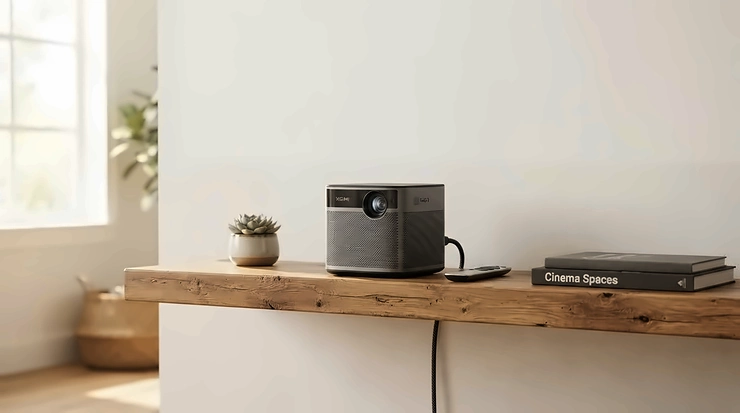
Here’s a scene most of us know too well: you’ve just signed up for another streaming service, your telly is showing its age, and the thought of squinting at a 43-inch screen for the next Marvel epic feels a bit… small. Enter the smart projector for streaming — the bit of kit that turns a blank wall into a proper cinema without you needing to remortgage the house or wrestle with a separate streaming stick every single evening.

What makes 2026’s crop genuinely different from the dusty office projector your school used for assemblies is that the smarts now live inside the box. Open the lid, connect to Wi-Fi, and Netflix, Disney+ and Prime Video are already sat there waiting for you, no dongles required. That’s a real shift from even three or four years ago, when “smart” often meant “smart enough to need three remotes.”
This guide is built the honest way. Every product below has been researched against real specifications, genuine UK availability and aggregated customer feedback — not invented reviews or fabricated hands-on claims. We’ll walk through seven models spanning budget, mid-range and premium, then dig into the comparisons, the setup tricks, and the mistakes that trip up first-time buyers. If you’ve been eyeing a smart projector for streaming and want something that won’t leave you fighting HDMI cables at 9pm on a Friday, you’re in exactly the right place.
Quick Comparison Table
| Model | Best For | Native Resolution | Built-In Apps | Price Range |
|---|---|---|---|---|
| Anker Nebula Capsule 3 | Budget portability | 1080p | Netflix, Google TV | around £300-£330 |
| WiMiUS P62 PRO | Tightest budget | 1080p (4K support) | Netflix, Prime Video | £150-£230 range |
| Yaber L2 Plus | Mid-range all-rounder | 1080p | Netflix, JBL audio suite | £200-£260 range |
| Anker Nebula Cosmos 4K SE | Sharpest mid-tier picture | 4K-class | Netflix, 10,000+ Google TV apps | £500-£600 range |
| Dangbei DBOX02 | Premium laser cinema | Native 4K | Netflix, Google TV | £1,300-£1,600 range |
| Anker Nebula Mars 3 | Outdoor & garden nights | 1080p | Netflix, Google TV | £600-£700 range |
| Epson EH-TW6250 | Chromecast & gaming | 4K PRO-UHD | Android TV, Chromecast built-in | around £750-£900 |
Looking at the spread here, there’s a clear pattern worth flagging before you scroll further: the jump from “has Netflix” to “has a genuinely bright, colour-accurate 4K picture” is where most of the money goes. According to Which?’s testing of home projectors, which focuses on models costing less than £1,000, plenty of excellent everyday options sit well below four figures — you don’t need to spend Dangbei money to get a satisfying result. Budget models like the WiMiUS P62 PRO earn their keep through sheer app convenience, while something like the Epson EH-TW6250 justifies its higher price range with proper home-cinema-grade brightness and gaming responsiveness.
💬 Found a model that’s caught your eye already? A quick share helps other buyers stumble onto this comparison too.
Top 7 Smart Projectors for Streaming: Expert Analysis
Coverage below spans true budget picks, sensible mid-rangers, and the premium end of the smart projector for streaming category — including portable, outdoor-ready and full home cinema variants.
1. Anker Nebula Capsule 3 — best lightweight streaming companion
The standout here is size: this is a can-shaped unit you can genuinely tuck into a rucksack, yet it still runs official Google TV with Netflix built directly into the interface. Specs-wise, you’re looking at 1080p output from a 200 ANSI lumen LED light source, paired with a built-in battery rated for roughly 2.5 hours of playback — enough for a film on the patio before it needs a top-up. The 30,000-hour LED lifespan means you’re not budgeting for a replacement bulb every couple of years, unlike older lamp-based units.
Based on the spec comparison against similarly priced portables, what stands out is the “official” Google TV certification — a lot of budget rivals run forked, unlicensed versions of Android that behave unpredictably with app updates. This one is genuinely built for renters, students, and anyone who wants a projector that lives in a drawer rather than mounted to a ceiling. Reviewers consistently note that battery drain accelerates noticeably in brighter viewing modes, so eco mode is the honest way to hit the advertised runtime.
Pros:
- ✅ Official Google TV with Netflix pre-installed, no extra devices
- ✅ Genuinely portable can-shaped design with built-in battery
- ✅ 30,000-hour LED lifespan avoids costly bulb replacements
Cons:
- ❌ 200 ANSI lumens struggles once curtains stay open
- ❌ Battery life drops fast outside of Eco viewing mode
Priced around £300-£330, the Anker Nebula Capsule 3 earns its spot as the pick for anyone who values genuine portability over sheer brightness.

2. WiMiUS P62 PRO — best value for a darkened room
What immediately stands out with the WiMiUS P62 PRO is officially licensed Netflix access sitting alongside 1400 ANSI lumens of brightness, which is unusually strong for this price bracket. The 36W Dolby Audio speaker setup also means you’re not automatically reaching for a soundbar on day one, and Wi-Fi 6 support keeps 4K-capable streams from stuttering the way older Wi-Fi 4 budget units often do.
Here’s what the spec sheet won’t tell you outright: 1400 ANSI lumens sounds impressive on paper, but it’s most comfortable in a room with blackout curtains rather than daytime football viewing. This is a projector for evening bingers rather than a living room TV replacement used with the lights on. Aggregated review sentiment on this model tends to praise the audio output relative to price, while a recurring theme in user feedback is that the auto-keystone correction occasionally needs a manual nudge on uneven surfaces.
Pros:
- ✅ Officially licensed Netflix avoids DRM playback issues
- ✅ 36W Dolby Audio speakers reduce the need for a soundbar
- ✅ Wi-Fi 6 keeps higher-resolution streams buffer-free
Cons:
- ❌ Auto-keystone sometimes needs manual fine-tuning
- ❌ Brightness fades noticeably with any ambient daylight
In the £150-£230 range, this remains one of the strongest value plays if your viewing happens mostly after dark.
3. Yaber L2 Plus — best all-rounder for shared living rooms
The Yaber L2 Plus pairs officially licensed Netflix with integrated JBL speakers, which is the standout combination here — you’re getting a recognised audio brand baked directly into the chassis rather than a generic “Hi-Fi stereo” claim. Auto-focus and electronic keystone correction round out a genuinely fuss-free setup experience for a mid-range model.
What most buyers overlook about this model is how much day-to-day convenience the auto-focus saves versus manually twisting a focus ring every time you nudge the unit. For a household that moves the projector between the living room and the garden depending on the weather, that’s a real quality-of-life upgrade rather than a marketing tick-box. Reviewers consistently flag the JBL-branded audio as punching above its price bracket, though some note the fan noise becomes noticeable during quieter dialogue scenes.
Pros:
- ✅ Officially licensed Netflix plus integrated JBL speakers
- ✅ Auto-focus removes manual adjustment between rooms
- ✅ Electronic keystone correction speeds up initial setup
Cons:
- ❌ Fan noise can intrude during quiet dialogue scenes
- ❌ Colour accuracy trails behind pricier 4K-class rivals
At £200-£260, the Yaber L2 Plus is a sensible middle-ground pick for shared households that move their setup around.
4. Anker Nebula Cosmos 4K SE — sharpest picture below premium pricing
The Cosmos 4K SE’s headline feature is access to the full Google TV app catalogue — reportedly over 10,000 apps including Netflix — combined with Anker’s own image processing engine aimed at natural colour reproduction. That app breadth genuinely separates it from cheaper Android-forked rivals, since Google TV certification guarantees ongoing app support rather than a fixed, ageing app list.
On paper this means fewer compromises: you’re not choosing between “has Netflix” and “has a wide app ecosystem,” you get both. Based on the spec comparison with the cheaper models above, the jump in native contrast and detail is the most obvious upgrade a family movie night would notice. What reviewers commonly report is that out-of-the-box colour calibration is warmer than some users prefer, though this is adjustable through the picture settings menu.
Pros:
- ✅ Over 10,000 Google TV apps including built-in Netflix
- ✅ Proprietary image engine improves colour naturalness
- ✅ Strong all-round pick for family film nights
Cons:
- ❌ Default colour calibration runs warmer than expected
- ❌ Heavier and less pocketable than the Capsule 3
Sitting in the £500-£600 range, this is the model to consider once picture quality starts mattering more than portability.
5. Dangbei DBOX02 — premium laser cinema experience
The Dangbei DBOX02‘s standout feature is its ALPD laser light source, delivering roughly 2450 ISO lumens — enough brightness to hold up in rooms that aren’t fully blacked out, which is rare at this end of the smart projector for streaming market. Native 4K resolution paired with full Google TV and officially licensed Netflix rounds out what is genuinely one of the more complete smart projector for streaming packages available.
What the spec sheet won’t tell you, but early adopters note, is how much the laser light source changes daily usability — no warm-up flicker, near-instant brightness, and a far longer rated lifespan than LED or lamp alternatives. This is the projector for someone who has already decided a projector is replacing their TV, not supplementing it. Aggregated feedback highlights the dual 12W speakers with DTS:X and Dolby Audio support as genuinely capable of filling a living room, reducing the pressure to buy a separate sound system immediately.
Pros:
- ✅ ALPD laser delivers 2450 ISO lumens for daytime-friendly viewing
- ✅ Native 4K plus officially licensed Netflix via Google TV
- ✅ Dual 12W speakers support DTS:X and Dolby Audio
Cons:
- ❌ Premium £1,300-£1,600 range price puts it out of reach for casual buyers
- ❌ Overkill for anyone only streaming occasionally in a small room
For serious home cinema builds, the Dangbei DBOX02 is the one to save up for.

6. Anker Nebula Mars 3 — best for outdoor and garden streaming
Battery stamina is the headline act here — in independent testing this model lasted over five hours in Eco mode while streaming Netflix, which is genuinely exceptional for a portable unit. An IPX3 water-resistance rating and a drop-resistant casing complete the picture of a projector actually designed to leave the house, rather than one that merely tolerates being carried outside occasionally.
Here’s what most buyers overlook about outdoor projectors generally: durability specs matter just as much as brightness once you’re setting up on grass at dusk with a slightly uneven table. The Mars 3’s integrated handle and rugged build genuinely reflect that use case rather than being an afterthought sticker on the box. Reviewers consistently praise the 40W three-speaker audio system for filling an outdoor space without an external soundbar, describing the sound as surprisingly full for the unit’s size.
Pros:
- ✅ Over five hours of Eco-mode battery life while streaming
- ✅ IPX3 water resistance suits UK garden evenings
- ✅ 40W three-speaker system fills outdoor spaces confidently
Cons:
- ❌ 1080p resolution trails behind indoor 4K-class rivals
- ❌ Higher £600-£700 range price for a non-4K panel
If garden cinema nights are the goal, the Anker Nebula Mars 3 is built specifically for that brief.
7. Epson EH-TW6250 — best for Chromecast, gaming and Apple TV setups
The standout feature on the Epson EH-TW6250 is its clever hidden compartment housing a dedicated Android TV streaming stick with Chromecast built-in — Epson’s workaround for licensing restrictions that normally stop projector brands from shipping full Android TV certification. Add 4K PRO-UHD processing, 2,800 lumens of 3LCD brightness and a 35,000:1 contrast ratio, and you’ve got a genuinely capable home cinema unit rather than a portable toy.
Based on the spec comparison with the Google TV-native models above, this Epson takes a different but equally valid route to smart functionality: rather than baking the smart OS directly into the projector, it bundles a purpose-built streaming stick that’s easy to update or swap. This also happens to be the strongest pick here for an Apple TV compatible projector setup, since the HDMI ARC port and sub-20ms input lag in Gaming Mode make it a genuinely comfortable partner for an external Apple TV box, a games console, or a soundbar chain. Reviewers highlight the picture quality-to-price ratio as excellent for the format, with occasional feedback noting the fan is audible in completely silent scenes.
Pros:
- ✅ Chromecast built-in via a hidden, swappable Android TV stick
- ✅ 4K PRO-UHD with 2,800 lumens handles ambient light well
- ✅ Sub-20ms Gaming Mode suits consoles and Apple TV boxes
Cons:
- ❌ Smart functionality depends on an external dongle, not native OS
- ❌ Fan noise is noticeable during hushed, dialogue-heavy scenes
In the £750-£900 range, the Epson EH-TW6250 is the one to shortlist if Chromecast, gaming, and external streaming boxes matter more than an all-in-one smart interface.
Practical Usage Guide: Setting Up Your Smart Projector for Streaming
Getting a smart projector for streaming running well in the first 30 days comes down to a few habits most listings never mention. First, prioritise a wired connection or a dedicated 5GHz Wi-Fi band where possible — projector Wi-Fi antennas are often smaller and weaker than a smart TV’s, so a router sitting two rooms away can quietly cap you at HD even on a “4K-ready” model. Second, run the auto-keystone and auto-focus tools every time you move the unit, even by a few centimetres; skipping this is the single most common cause of that slightly blurry, trapezoid-shaped picture people assume is a hardware fault.
Maintenance-wise, dust is the enemy of any light source, so a monthly wipe of the intake vents with a dry cloth keeps LED and laser units running at rated brightness for longer. For firmware, set updates to install overnight rather than ignoring the prompts — outdated software is a common, quietly-reported cause of Netflix or Disney+ apps suddenly refusing to load. Finally, resist the urge to run max brightness constantly: most units include an Eco or Movie mode that meaningfully extends component lifespan and, for battery models, doubles or triples usable runtime — a proper trade worth making for anyone actually trying to stretch a viewing session.

Real-World Scenarios: Which Smart Projector Suits You?
If you’re a student in a shared house streaming most evenings from a single bedroom, something like the Anker Nebula Capsule 3 makes sense — it’s quiet, small enough to hide when guests visit, and doesn’t demand a permanent ceiling mount you can’t install as a tenant. Budget matters here more than raw brightness, since curtains are usually already closed by the time viewing starts anyway.
Picture a family of four wanting one shared screen for Disney+ afternoons and Prime Video evenings alike: the Anker Nebula Cosmos 4K SE fits that brief well, balancing app breadth, picture quality and a price range that doesn’t require a serious financial commitment. And for a couple who’ve already invested in a proper home cinema room, complete with an Apple TV box and a soundbar, the Epson EH-TW6250 or Dangbei DBOX02 reward that setup with brightness and audio that hold their own against a genuine cinema screen.
Buyer’s Decision Framework: Choosing Fast
If portability matters more than picture size, choose a battery-powered model like the Anker Nebula Capsule 3 or Anker Nebula Mars 3, because you’ll get freedom to move rooms or go outdoors without rewiring anything. If your priority is squeezing the most content apps out of a modest budget, choose a Google TV or officially licensed model such as the WiMiUS P62 PRO, because certified app access avoids the frustration of streaming apps quietly breaking after updates. If picture quality is non-negotiable and budget is flexible, choose a laser 4K unit like the Dangbei DBOX02, because native resolution and higher lumens are the two specs that most visibly separate “good enough” from “genuinely cinematic.” And if you already own an Apple TV box, games console or soundbar, choose a projector with strong HDMI ARC and low input lag, such as the Epson EH-TW6250, because it slots into an existing setup rather than replacing it.
What Is a Smart Projector for Streaming?
A smart projector for streaming is a projector with a built-in operating system — usually Google TV, Android TV or a licensed proprietary platform — giving direct access to apps such as Netflix, Disney+ and Prime Video without needing a separate streaming stick or box plugged in.
That single distinction is what separates this category from the “dumb” projectors many of us grew up with, which needed a laptop, DVD player or external streaming device connected via HDMI just to show anything at all.
How to Choose a Smart Projector for Streaming
- Check the app licensing, not just the promise. Officially licensed Netflix or Google TV certification means guaranteed app support; an unlicensed Android fork can lose access to apps overnight after an update.
- Match brightness to your room, not the box. Aim for at least 800-1,000 ANSI lumens for a darkened room, and 1,400 lumens or more if curtains rarely close during viewing.
- Confirm your broadband can actually feed it. According to Ofcom’s consumer research into UK home broadband performance, streaming quality scales directly with your connection’s download speed, so a 4K-capable projector on a slow line will still look like standard definition.
- Weigh portability against permanence. A battery-powered portable suits renters and multi-room households; a mains-only home cinema unit suits a dedicated space you won’t be moving.
- Look past resolution to contrast ratio. A projector with a higher contrast ratio will often look more cinematic than a higher-resolution rival with washed-out blacks.
- Factor in audio realistically. Built-in speakers are fine for casual viewing, but serious movie nights usually still benefit from an external soundbar via HDMI ARC or Bluetooth.
- Read aggregated review themes, not star ratings alone. A 4.5-star average can still hide a recurring fan noise or keystone complaint worth knowing about before you buy.
Smart Projector Content Apps: Netflix, Disney+, Prime Video, Chromecast & Apple TV Compared
Not every “smart” claim means the same thing in practice, so here’s an honest breakdown of what each secondary feature actually delivers once you’re sat on the sofa.
Netflix Projector: What “Built-In” Really Means
A genuine Netflix projector carries official licensing from Netflix itself, which guarantees HD or 4K playback and Widevine DRM compliance. Unlicensed Android-based units can technically sideload the app, but playback frequently caps at a lower resolution or breaks entirely after a firmware update — a distinction worth checking in the listing description before you commit.
Disney Plus Projector Compatibility Explained
Every Google TV and Android TV certified model in this roundup — the Anker Nebula Capsule 3, Anker Nebula Cosmos 4K SE, Anker Nebula Mars 3 and Dangbei DBOX02 — supports Disney+ directly through the Google Play Store, no workaround required. The Epson EH-TW6250‘s bundled Android TV stick covers the same ground, since Disney+ is a standard listing on that platform too.
Amazon Prime Video Projector Performance
Prime Video is near-universally supported across Google TV, Android TV and most licensed proprietary platforms, including every model featured here. Where it’s worth paying attention is HDR handling: Prime Video’s HDR10 content looks noticeably better on the higher-lumen, higher-contrast units like the Dangbei DBOX02 than on 200-lumen portables, where HDR can actually look flatter than standard dynamic range in a bright room.
Projector with Chromecast Built In: Casting from Your Phone
If casting from a phone matters more to you than an on-device app store, the Epson EH-TW6250 is the standout here, with Chromecast built in via its bundled Android TV stick — genuinely handy for casting a holiday photo slideshow or a YouTube video without hunting for the right remote button. Google TV models generally support the same casting behaviour natively, since Chromecast functionality is baked into the platform itself.
Apple TV Compatible Projector: What to Check Before Buying
For households already invested in Apple’s ecosystem, an Apple TV compatible projector doesn’t necessarily need a native Apple TV app — connecting an existing Apple TV box via HDMI works with any of the seven models above. What matters more is HDMI ARC support and low input lag, both of which the Epson EH-TW6250 handles comfortably. Native AirPlay support does appear on some newer Google TV firmware builds, but availability varies by model and update cycle, so it’s worth checking the current listing rather than assuming it’s included.
Smart Projector vs Streaming Stick: Which Wins for Streaming?
A £30-£50 streaming stick plugged into an existing TV will always win on picture quality per pound, simply because a decent television’s panel outperforms a projected image in a normally lit room. Where a smart projector for streaming wins outright is screen size for the money — getting a 100-inch-plus picture from a comparably priced television is simply not realistic for most UK budgets. It also wins on flexibility: a portable model moves between bedroom, living room and garden in a way a wall-mounted TV never will.
The honest trade-off is ambient light tolerance and setup effort. A streaming stick on a TV works identically whether it’s midday or midnight; a projector generally needs some control over room lighting to look its best, and even auto-focus models benefit from an occasional manual tweak. If your household watches mostly after dark and craves a genuinely big screen, the projector wins comfortably; if daytime viewing dominates, a smart TV with a streaming stick remains the safer, lower-maintenance choice.
Features That Actually Matter (And Those That Don’t)
Cutting through the marketing noise: ANSI lumens, contrast ratio, and confirmed app licensing are the specs that genuinely predict day-to-day satisfaction. A projector’s brightness is measured in lumens, the standard unit for luminous flux, and ANSI lumens specifically use a standardised nine-point measurement that’s far more trustworthy than vague “LED lumens” marketing figures often seen on ultra-cheap listings.
What matters far less than the box art suggests: headline resolution claims like “4K supported” often mean a 1080p native panel using pixel-shifting to simulate a 4K input, which looks noticeably softer than genuine native 4K. Similarly, huge advertised screen sizes (“project up to 300 inches!”) are technically true but rarely usable, since brightness collapses well before you approach those extremes in a normal UK living room.
Common Mistakes When Buying a Smart Projector for Streaming
The most frequent misstep is buying based on lumens alone without checking contrast ratio, resulting in a bright but flat, washed-out picture during darker Netflix dramas. A close second is ignoring Wi-Fi specifications entirely — a projector with only 2.4GHz Wi-Fi 4 will genuinely struggle to sustain a stable 4K stream in a busy household, regardless of how capable the panel itself is.
Buyers also commonly underestimate placement requirements, assuming any wall will do, only to discover their room’s throw distance can’t produce a usable image size without repositioning furniture. And a surprisingly common regret reported in aggregated reviews is skipping audio consideration entirely, assuming built-in speakers will be “fine,” then immediately shopping for a soundbar within weeks of purchase.
What to Expect: Real-World Streaming Performance
On paper, specs like “1400 ANSI lumens” or “35,000:1 contrast ratio” are abstract numbers; in practice, they translate into everyday experiences worth picturing before you buy. A sub-500 lumen portable genuinely means waiting for proper darkness before starting a film — fine for a bedroom after sunset, frustrating for a family movie afternoon. A 1,400+ lumen model with strong contrast, by comparison, tends to hold up reasonably well even with curtains only partially drawn.
For Netflix’s darker prestige dramas specifically, black level matters more than most buyers expect going in, since shadow detail and depth are what separate a cinematic scene from a flat grey rectangle. Gaming through an attached console tells a similar story: input lag figures under 20ms feel genuinely responsive, while anything above 40ms becomes noticeable during fast-paced titles, even if the visual quality itself is excellent.
Long-Term Cost & Maintenance
Total cost of ownership for a smart projector for streaming extends well beyond the sticker price. LED and laser light sources, used across every model in this guide, are rated for tens of thousands of hours — practically the lifetime of the device — which is a meaningful upgrade over older lamp-based projectors that historically needed a £100-plus replacement bulb every 3,000-5,000 hours. That single difference alone can make a pricier LED or laser unit cheaper over five years than a budget lamp-based alternative.
Ongoing costs are otherwise minimal: streaming subscriptions themselves (Netflix, Disney+, Prime Video) are the same regardless of the screen you watch them on, and power draw for most of these units sits comfortably below that of an equivalent-sized LED television. Where costs can creep in is accessories — a proper projection screen, ceiling mount, or external soundbar can easily add £100-£300 to the true cost of a “budget” projector, so it’s worth budgeting for those extras upfront rather than treating them as an afterthought.
Safety, Regulations & Compliance for UK Streaming Setups
UK buyers should look for CE or UKCA marking on any projector before purchase, confirming the unit meets recognised electrical safety standards for sale in the UK market. Ceiling-mounted units in particular should be installed using the manufacturer’s specified bracket and weight limits, since projectors are heavier than they look once you’re working overhead.
When it’s eventually time to replace or dispose of an old unit, UK regulations require electronics to be recycled rather than binned, given the lead and other materials inside these devices. The UK’s WEEE regulations exist specifically to reduce the amount of unwanted electricals sent to landfill or incineration, and most retailers now offer free take-back schemes when you buy a replacement, so there’s rarely a good reason to let an old projector gather dust in a cupboard indefinitely.
Frequently Asked Questions
❓ Do all smart projectors have Netflix built in?
❓ Can I use a smart projector with Chromecast built in without a smart TV?
❓ Is a smart projector for streaming good enough to replace a TV?
❓ Do I need a separate device for an Apple TV compatible projector?
❓ What internet speed does a smart projector for streaming need?
Conclusion
Choosing the right smart projector for streaming really comes down to being honest with yourself about your room, your habits and your budget rather than chasing the biggest number on the box. A student wanting something portable and cheap has a genuinely different best answer than a family building a proper home cinema corner, and that’s exactly why this guide spread its seven picks across budget, mid-range and premium tiers rather than crowning a single “best overall” and calling it a day.
What ties every recommendation together is the same underlying principle: officially licensed apps, sensible brightness for your actual room, and realistic expectations about broadband and audio will get you further than obsessing over headline resolution alone. Whether you land on the pocketable Anker Nebula Capsule 3 or the laser-powered Dangbei DBOX02, the fundamentals covered above — from setup habits to long-term costs — apply just as much on day one as they will three years down the line.
✨ Don’t Miss These Exclusive Deals!
🔍 Take your streaming setup to the next level with these carefully selected projectors. Click on any highlighted model to check current pricing and availability. These picks will help you build a proper home cinema your whole household will love!
Recommended for You
- Smart Portable Projector: 7 Best Picks for UK Homes (2026)
- How Long Does a Battery Projector Last: 7 Real Picks (2026)
- Battery Powered Projector 2026: 7 Best Rechargeable Picks
Disclaimer: This article contains affiliate links. As an Amazon Associate, I earn from qualifying purchases. If you purchase products through these links, we may earn a small commission at no additional cost to you.
✨ Found this helpful? Share it with your friends! 💬🤗
