
In This Article
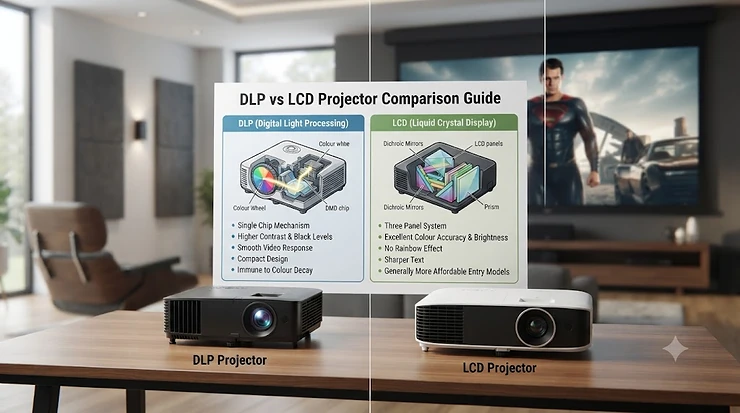
Somewhere between “just buy a big telly” and “I’ve built a dedicated cinema room,” there’s a question that trips up almost every first-time projector buyer: DLP vs LCD projector, which one should actually land in your basket? It sounds like the sort of spec-sheet trivia only AV nerds care about, but it genuinely changes what you’ll see on your wall every single evening. Digital Light Processing (DLP) bounces light off thousands of tiny mirrors on a single chip, while LCD — specifically 3LCD — splits light through three separate glass panels, one each for red, green and blue. Neither is objectively “better.” They’re different trade-offs wearing different price tags.
If you’ve read a few forum threads, you’ve probably picked up fragments: DLP is sharper but can show a “rainbow” flicker, LCD is richer in colour but slightly softer round the edges, and somewhere in the mix sits “3LCD” as a trademarked variant that Epson likes to shout about. All true, but none of it tells you which projector to actually buy for your living room, your garden movie nights, or your gaming setup. That’s what this guide sorts out. We’ve dug into seven real, currently available projectors spanning budget to premium, weighed up genuine review sentiment from trusted testers, and built a decision framework so you’re not just guessing. Prices below are given as ranges rather than fixed figures, since retailer pricing shifts constantly — always check the current price before buying.
Quick Comparison Table: DLP vs LCD Projector at a Glance
| Factor | DLP Projector | 3LCD Projector |
|---|---|---|
| Rainbow effect risk | Possible on single-chip models | None (no colour wheel) |
| Perceived sharpness | Very high, crisp pixel edges | Slightly softer unless panels perfectly converged |
| Colour brightness | Can lag behind white brightness | Colour and white brightness usually matched |
| Typical black levels | Deep greys, strong with dynamic iris | Decent, varies by panel and iris quality |
| Best for | Gaming, bright rooms, sharp detail fans | Colour-accurate movie nights, rainbow-sensitive viewers |
Reading across that table, the honest takeaway is that a DLP projector generally edges out on raw sharpness and gaming responsiveness, while a 3LCD model tends to feel more natural in colour straight out of the box. Neither wins on every row, which is exactly why your specific viewing habits — sport in daylight versus film in a blacked-out room — should decide the winner. If you’re sensitive to flicker (more on that below), that single factor can outweigh every other spec on this table.
💬 Already leaning one way? Scroll down to see which of our seven picks matches your budget and viewing style — check current prices before they change!
Top 7 DLP and LCD Projectors: Expert Analysis
We’ve mixed proven DLP models with Epson’s 3LCD range to cover every budget, from a sub-£700 starter unit through to a genuinely premium home cinema centrepiece. Each pick below reflects real specifications and aggregated review sentiment, not manufacturer marketing copy.
1. ViewSonic PX701-4K — best budget entry into true 4K DLP
The ViewSonic PX701-4K proves you no longer need to spend four figures to get a genuine 4K pixel-shifting picture on your wall. Built around Texas Instruments’ 0.47-inch DLP chip, it uses XPR pixel-shifting to display all 8.3 million pixels of a 3840×2160 image, and its 3,200 ANSI lumen rating means it holds up reasonably well even with some ambient light in the room. In practice, that brightness rating matters more than most buyers realise: a dimmer projector forced into a living room with any daylight leakage will look washed out, while the PX701-4K has enough punch for a curtains-half-open Saturday afternoon film.
Based on the spec comparison with rival budget models, the standout here is the 4.2ms input lag at 240Hz, which is unusually fast for a 4K-capable projector at this price and makes it a sneaky good shout for casual console gaming on the side. It’s best suited to first-time buyers and gamers who want a genuinely big screen without genuinely big spending, rather than dedicated film purists chasing reference-level black levels. Reviewers consistently note that out-of-the-box colour accuracy is merely “watchable” rather than accurate, and that contrast and shadow detail are the clear compromises made to hit this price point.
Pros:
- ✅ Genuine 4K UHD pixel-shifted resolution at a budget price
- ✅ Fast 4.2ms input lag good for casual gaming
- ✅ Long-rated 20,000-hour lamp life in eco mode
Cons:
- ❌ Contrast and black levels trail pricier DLP rivals
- ❌ Limited 1.1x optical zoom restricts placement flexibility
At around £650-750, the ViewSonic PX701-4K represents strong value for anyone dipping a toe into home cinema for the first time, though serious film fans will likely want to budget up.
2. Epson EH-TW6250 — most compact 3LCD smart projector
The Epson EH-TW6250 is Epson’s answer to buyers who want the colour advantages of 3LCD technology bundled into a genuinely liveable, coffee-table-friendly box. It packs built-in Android TV, meaning no dangling streaming stick, plus a 2,800 lumen rating and a claimed 35,000:1 contrast ratio in a chassis small enough to tuck away between movie nights. What that lumen figure translates to in practice is a picture that holds its own in a normally lit living room during early evening, rather than requiring you to wait for full darkness.
Epson’s 3LCD engine means there’s no colour wheel spinning behind the lens, so what most buyers overlook about this model is that it sidesteps the rainbow effect issue entirely — useful if anyone in the household has ever complained of “flickering colours” on a DLP projector. It suits families who want one box that does streaming, film night, and the odd sports afternoon without extra hardware faff. Aggregated review sentiment around Epson’s mid-range 3LCD range consistently praises the vertical lens shift and 1.6x zoom for easy setup, though the lag time is not tuned for serious gaming the way the ViewSonic PX701-4K is.
Pros:
- ✅ Built-in Android TV removes the need for a streaming stick
- ✅ 3LCD light engine avoids the rainbow effect completely
- ✅ Compact, lightweight chassis with generous 1.6x zoom
Cons:
- ❌ Around 20ms lag makes it a lesser choice for competitive gaming
- ❌ 1080p native panel means the “4K” label relies on pixel-shift enhancement
Priced in the roughly £800-950 range, the Epson EH-TW6250 earns its keep as a genuinely no-fuss, all-in-one family projector.
3. Optoma UHD38x — best for lag-free console and PC gaming
If gaming is the actual reason you’re shopping for a projector, the Optoma UHD38x deserves top billing. It’s the current iteration of Optoma’s acclaimed gaming-focused DLP line, built around the same 0.47-inch DMD chip family, and its headline trick is an Enhanced Gaming Mode dropping input lag to a genuinely competitive 4.2ms at 1080p/240Hz, or 16.7ms at a still-respectable 4K/60Hz. On paper this means console players can react to on-screen action almost as fast as they would on a dedicated gaming monitor, just projected at up to 300 inches.
What the spec sheet won’t tell you, but reviewers note, is that despite pushing out roughly 4,000 ANSI lumens, this particular DLP model has managed to keep the rainbow effect largely under control thanks to its eight-segment colour wheel, with testers repeatedly reporting little to no visible fringing during fast motion. It’s the clear pick for anyone treating game night as seriously as film night, particularly households with a large blank wall and no interest in a short-throw setup. Families who want a plug-and-play cinema box, however, will find its long-throw lens and modest 1.1x zoom less forgiving to install than the Epson alternatives on this list.
Pros:
- ✅ Class-leading 4.2ms input lag for competitive gaming
- ✅ Bright 4,000 ANSI lumens usable in daytime rooms
- ✅ Minimal reported rainbow effect for a single-chip DLP unit
Cons:
- ❌ Long-throw lens needs roughly 3m for a 100-inch image
- ❌ Only 1.1x optical zoom limits flexible placement
Sitting in the region of £950-1,100, the Optoma UHD38x is a smart, focused purchase for gamers who also happen to enjoy films on the side.
4. BenQ TK860i — best all-rounder for sport and bright-room viewing
BenQ built its reputation on bright, punchy DLP projectors for exactly this scenario: watching football on a Saturday afternoon without drawing every curtain in the house. The BenQ TK860i carries forward the acclaimed HDR-PRO tone mapping and Dynamic Iris technology from BenQ’s earlier TK850-series models, paired with Android TV built in and a dedicated Sports picture/sound mode. Reviewers of the previous-generation TK850i consistently praised its 30,000:1 dynamic contrast and unusually strong out-of-the-box colour accuracy for a DLP unit, something BenQ’s Cinecolor system deserves credit for.
Here’s what to weigh: this is a true 4K pixel-shifting projector rated around 3,000 lumens, so it sits a notch below the Optoma UHD38x for sheer brightness but ahead of it for HDR tone mapping and colour handling, especially in darker HDR scenes where cheaper DLP rivals tend to blow out highlights or crush shadow detail. Reviewers note that DLP colours can lean slightly towards red, though BenQ’s processing keeps that in check better than most competitors at this price. It’s best suited to households who split their viewing roughly evenly between daytime sport and evening film, rather than dedicated dark-room cinephiles.
Pros:
- ✅ HDR-PRO tone mapping delivers strong out-of-the-box HDR colour
- ✅ Dedicated Sports picture and sound modes for daytime viewing
- ✅ Built-in Android TV with Chromecast and voice search
Cons:
- ❌ Brightness trails dedicated gaming rivals like the Optoma UHD38x
- ❌ Fan noise becomes noticeable in its brightest picture mode
Expect to pay somewhere in the £1,000-1,200 range for the BenQ TK860i, making it a sensible middle-ground pick between the budget DLP options and BenQ’s pricier LED models.
5. Epson EH-TW7100 — best mid-range 3LCD for living-room HDR
Sold in some markets as the Home Cinema 3800, the Epson EH-TW7100 is where Epson’s 3LCD engine really starts to flex. It’s rated at 3,000 lumens with a 100,000:1 contrast ratio, uses E-shift pixel-shifting to approximate 4K, and — unusually for a projector at this level — includes built-in Bluetooth audio streaming to a soundbar or headphones alongside its own 2x10W speakers. Reviewers consistently describe the resulting picture as bright, contrasty, and colourful across a wide range of source material, from glossy 4K HDR streaming down to older standard-definition broadcasts.
Based on the spec comparison with the cheaper Epson EH-TW6250, the jump in lumens and contrast is genuinely noticeable in a living room with some ambient light, and the manual lens shift levers make squaring up the image on an irregular wall considerably easier than fiddling with digital keystone correction. What most buyers overlook is that this is still fundamentally a “family room” projector rather than a reference cinema unit — reviewers note its black levels lag behind Epson’s own flagship models, with dark HDR scenes looking a touch grey rather than truly inky. Even so, for anyone who wants 3LCD’s colour consistency without paying premium prices, it’s a genuinely strong middle ground.
Pros:
- ✅ Bright, punchy 4K HDR image with strong daytime usability
- ✅ Built-in Bluetooth audio streaming, unusual at this price
- ✅ Manual lens shift and generous 1.62x zoom simplify setup
Cons:
- ❌ Black levels look greyish in dark HDR scenes
- ❌ Dynamic iris can cause visible brightness pumping
Typically priced in the £1,200-1,400 range, the Epson EH-TW7100 is the projector we’d point most families towards if colour accuracy and easy setup matter more than absolute black-level performance.
6. BenQ W2720i — best premium LED-DLP for cinematic colour
Stepping up into genuinely premium territory, the BenQ W2720i swaps a conventional lamp for an LED light engine, which brings two real-world benefits: dramatically longer light-source life (rated in the tens of thousands of hours) and noticeably more consistent colour over that lifespan, since LEDs don’t dim and shift colour the way ageing UHP lamps do. This is a 4K DLP projector aimed squarely at buyers who’ve outgrown budget models and want something closer to a proper home cinema experience without stepping up to laser pricing.
What the spec sheet won’t tell you, but reviewers of BenQ’s LED-DLP range consistently note, is that the wider colour gamut on offer — reaching deep into DCI-P3 territory — produces noticeably more natural skin tones and film-accurate colour than cheaper DLP rivals, addressing one of the classic criticisms levelled at single-chip projectors. It’s best suited to buyers who watch a genuine mix of streamed film, broadcast TV and the odd game, and who’d rather spend a bit more now than replace a lamp bulb every couple of years. Households prioritising raw gaming response time may still find the Optoma UHD38x the sharper tool for that specific job.
Pros:
- ✅ LED light source lasts far longer than traditional lamps
- ✅ Wide colour gamut with genuinely accurate skin tones
- ✅ Consistent brightness and colour across its lifespan, unlike ageing lamps
Cons:
- ❌ Noticeably pricier than lamp-based DLP alternatives
- ❌ Input lag not as aggressively tuned as dedicated gaming models
Sitting around the £1,600-1,800 mark, the BenQ W2720i rewards buyers who see a projector as a five-to-ten-year investment rather than a quick upgrade.
7. Epson EH-TW9400 — best premium 3LCD for a genuine home cinema
At the top of our list sits the Epson EH-TW9400, sold in some regions as the Pro Cinema 6050UB, and widely regarded by reviewers as one of the best value-for-money propositions in premium home cinema. Built around a 0.74-inch 3LCD D9 panel with Micro Lens Array technology, it covers the full DCI-P3 colour spectrum in its Digital Cinema preset and offers ten lens memory slots, useful for anyone running a 2.35:1 scope screen alongside standard 16:9 content. Reviewers consistently describe the resulting image as vibrant, contrast-rich, and “effortlessly cinematic,” with no fringing artefacts of the kind occasionally still seen on rival DLP models.
Here’s what to weigh: this is still not a native 4K panel — Epson’s 4K Enhancement technique uses pixel-shifting rather than a true 4K chip — but reviewers are near-unanimous that the shortfall versus genuinely native 4K projectors from Sony or JVC is difficult to spot in real viewing conditions, especially given the price gap involved. It’s the obvious pick for anyone building a proper light-controlled home cinema room and prioritising colour fidelity, contrast and lack of DLP-style artefacts over sheer brightness for daytime sport. Casual living-room viewers who mostly watch during the day would be better served by one of the brighter, cheaper models further up this list.
Pros:
- ✅ Full DCI-P3 colour coverage for genuinely cinematic images
- ✅ No rainbow effect or colour-wheel artefacts whatsoever
- ✅ Excellent build quality with ten lens memory presets
Cons:
- ❌ Not native 4K, relying on pixel-shift enhancement
- ❌ Large chassis needs a dedicated, light-controlled room to shine
Expect to pay in the region of £2,400-2,600 for the Epson EH-TW9400, a genuine step up for anyone serious about home cinema rather than casual living-room viewing.
Top 7 Products: Specs, Price Range & Best For
| Product | Technology | Resolution | Brightness | Price Range | Best For |
|---|---|---|---|---|---|
| ViewSonic PX701-4K | DLP | 4K (pixel-shifted) | 3,200 lumens | £650-750 | Budget 4K entry |
| Epson EH-TW6250 | 3LCD | 1080p/4K enhance | 2,800 lumens | £800-950 | Compact family use |
| Optoma UHD38x | DLP | 4K (pixel-shifted) | ~4,000 lumens | £950-1,100 | Gaming |
| BenQ TK860i | DLP | 4K (pixel-shifted) | ~3,000 lumens | £1,000-1,200 | Sport & bright rooms |
| Epson EH-TW7100 | 3LCD | 4K enhance | 3,000 lumens | £1,200-1,400 | Living room HDR |
| BenQ W2720i | LED-DLP | 4K (pixel-shifted) | High, LED-stable | £1,600-1,800 | Premium colour |
| Epson EH-TW9400 | 3LCD | 4K enhance | High | £2,400-2,600 | Dedicated cinema room |
Looking at the table above, there’s a clear pattern: DLP dominates the budget-to-mid gaming space thanks to faster processing and lower lag, while 3LCD tends to win out once colour accuracy and freedom from artefacts become the priority. The BenQ W2720i sits as something of a hybrid, using DLP’s sharpness with an LED source that closes much of the colour-consistency gap traditionally associated with lamp-based single-chip projectors. Budget-conscious buyers should note that the jump from the ViewSonic PX701-4K to the Epson EH-TW7100 roughly doubles the price but delivers meaningfully better contrast and setup flexibility, which is usually worth it if you’re keeping the projector for several years.
💬 Found your match? Check the current price on the model that suits your setup before it changes!😊
DLP vs LCD Image Quality: What the Numbers Don’t Tell You
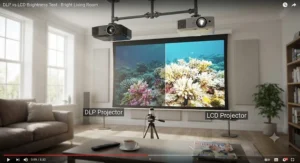
Spec sheets list brightness in ANSI lumens and contrast as a ratio, but neither number captures what actually differs between DLP and LCD image quality in daily use. DLP projectors, particularly single-chip models, tend to produce a razor-sharp pixel structure because there’s only one imaging surface for light to pass through, with none of the panel-alignment risk that affects three-panel designs. Reviewers of BenQ’s DLP range repeatedly note there’s no potential for panel misalignment, unlike 3LCD, where three separate panels need to be precisely converged to avoid soft colour fringing at high-contrast edges.
Where 3LCD tends to win is colour brightness. Because 3LCD projectors don’t rely on a spinning colour wheel to sequentially flash red, green and blue, their colour output is typically as bright as their white output — something Epson has long marketed under the banner of equally high “White Light Output” and “Colour Light Output.” DLP projectors using a colour wheel can sometimes show a gap between white brightness and colour brightness, meaning a DLP unit rated at similar lumens to an LCD rival may still look slightly less punchy in fully saturated scenes. Reviewers consistently note that in a fully darkened room, well-specified projectors from either camp can look remarkably similar, but the moment ambient light enters the equation, brightness architecture starts to matter far more than resolution.
The Rainbow Effect Explained: Causes, Sensitivity and Who Actually Notices It
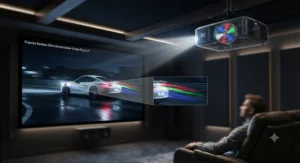
The rainbow effect is the single most-discussed downside of single-chip DLP projectors, and it’s worth unpacking honestly rather than dismissing or exaggerating it. It happens because a single-chip DLP projector displays red, green and blue sequentially, extremely quickly, using a spinning colour wheel (or, on some newer designs, sequential LED flashing) rather than showing all three colours simultaneously the way a 3LCD projector does. Most viewers’ brains blend those rapid flashes into a single, stable colour. But during fast eye movement, particularly when tracking bright moving objects against dark backgrounds, some people perceive brief, flickering streaks of colour — the “rainbow” in question.
Crucially, sensitivity to this effect varies enormously between individuals, and that variance is exactly why online reviews of the same DLP projector can wildly disagree. Some viewers never notice it across years of ownership; others find even a well-specified model, like the Optoma UHD38x with its eight-segment colour wheel, mildly distracting during high-motion football or fast-cut action films. According to reviewers who tested the earlier BenQ TK850, even with a four-segment RGBW colour wheel design, no obvious rainbow effect was spotted during testing — evidence that modern colour wheel engineering has genuinely improved over the units that gave DLP its reputation a decade ago. If you or anyone in your household has previously found DLP flicker distracting, that’s the single strongest signal to lean towards a 3LCD model like the Epson EH-TW7100 or Epson EH-TW9400, since 3LCD architecture makes the rainbow effect structurally impossible rather than merely reduced.
DLP Projector Pixel Structure vs LCD Panel Alignment
Underneath the marketing language, DLP and 3LCD create images through genuinely different hardware, and understanding the pixel structure explains a lot of what you’ll read in reviews. A DLP chip, known as a DMD (Digital Micromirror Device), is a single silicon surface covered in thousands or millions of microscopic mirrors, each tilting to reflect light either towards the lens or away from it many thousands of times per second. Because there’s only one chip, there’s no possibility of misalignment between colour channels — every pixel on screen originates from exactly the same physical mirror location, which is precisely why DLP images are frequently described by reviewers as razor-sharp with clean pixel edges.
3LCD technology takes a different approach entirely: light passes through a prism that splits it into red, green and blue beams, each hitting its own dedicated LCD panel before recombining through a second prism on the way to the lens. This produces excellent, wheel-free colour, but it does introduce a manufacturing challenge called convergence — the three panels must be optically aligned to sub-pixel precision, and even small deviations can produce faint colour fringing around high-contrast edges, an issue reviewers of budget 3LCD models have occasionally flagged. On well-engineered mid-range and premium 3LCD projectors like the Epson EH-TW7100 and Epson EH-TW9400, this convergence is factory-calibrated tightly enough that most viewers will never spot it, but it’s worth knowing the pixel-structure trade-off exists in principle even if it rarely shows up in practice on Epson’s better models.
3LCD Technology Explained: How Three Panels Build an Image
“3LCD” isn’t a generic description — it’s a specific trademarked technology developed and licensed primarily around Epson’s projector range, and understanding how it physically works clarifies why Epson leans so heavily on the branding. Inside a 3LCD projector, white light from the lamp or LED source passes through dichroic mirrors that split it into its red, green and blue components. Each colour beam is then directed through its own dedicated LCD panel, which acts like a tiny, transparent television screen for that single colour channel, modulating light pixel by pixel before a prism recombines all three images into one full-colour picture that passes through the lens.
The practical upshot, as one 3LCD manufacturer’s engineering notes put it, is that “the advantage of three LCD panels — one each for the three primary colours of red, green and blue — is that there’s no need for a colour wheel,” which is the direct structural reason 3LCD projectors don’t suffer rainbow artefacts. What most buyers overlook is that this same architecture is also why 3LCD models tend to post genuinely equal colour and white brightness figures, since every colour is projected continuously rather than in rapid sequential flashes. The trade-off, as covered above, is the panel convergence requirement — a manufacturing complexity DLP’s single-chip design simply doesn’t have to solve.
LCD vs DLP for Home Cinema: Which Wins in a Dark Room?
Home cinema is arguably the scenario where the DLP vs LCD projector debate matters most, because a properly darkened room removes ambient light as a variable and puts contrast, black level and colour purity front and centre. According to Which?’s guidance on projectors versus TVs, one of the core trade-offs of any projector versus a television is that you’ll need a genuinely dark room for the picture to avoid looking washed out, which makes light-control planning just as important as which projection technology you choose.
In a dark room, 3LCD’s freedom from rainbow artefacts becomes a genuine advantage for extended film viewing, since even mildly sensitive viewers can watch a two-hour film without the fatigue some report from rainbow flicker. The Epson EH-TW9400 in particular earns its reputation here, with reviewers describing its dark-room performance as “effortlessly cinematic.” That said, well-specified DLP models with strong dynamic iris implementations, like the BenQ TK860i, can produce black levels and contrast that rival or beat cheaper 3LCD rivals, so the technology alone doesn’t guarantee cinema-room success — the specific model, iris quality and native contrast rating matter just as much as which chip sits behind the lens.
How to Choose Between DLP and LCD Projectors
Cutting through the spec sheets — and echoing much of Which?’s independent projector testing advice — here’s a practical framework for deciding which technology and model actually suits your household:
- Identify your primary viewing scenario first. If gaming or bright-room sport viewing dominates, prioritise DLP models like the Optoma UHD38x for low lag and high lumens; if film-night colour accuracy matters most, lean towards 3LCD.
- Test your rainbow-effect sensitivity if possible. Watch any single-chip DLP projector in a shop or a friend’s living room before committing, since sensitivity is genuinely individual and no spec sheet captures it.
- Match brightness to your actual room, not your ideal room. A 2,800-3,000 lumen model like the Epson EH-TW6250 suits most living rooms with some ambient light; darker dedicated rooms can drop this priority.
- Budget for the whole ecosystem, not just the projector. Factor in a screen, mounting hardware, and potentially a soundbar, since built-in speakers on most models are merely adequate.
- Consider light-source type for long-term cost. LED models like the BenQ W2720i cost more upfront but avoid recurring lamp-replacement expense over several years of ownership.
- Check throw distance against your actual room dimensions. Long-throw models like the Optoma UHD38x need roughly 3 metres for a 100-inch image, which rules them out for smaller rooms.
- Weigh resolution claims carefully. Most projectors under roughly £1,500 use pixel-shifting rather than native 4K panels; this is a legitimate approximation technique, not a con, but it’s worth understanding before comparing prices against native 4K models.
Common Mistakes When Buying a DLP or LCD Projector
Even well-researched buyers trip up on a handful of recurring pitfalls. The first is assuming brightness alone determines picture quality — a projector’s colour brightness, contrast handling and iris performance matter just as much as its headline lumen rating, and two models with identical lumens can look meaningfully different in a bright room. The second common mistake is underestimating throw distance requirements, buying a long-throw DLP unit like the Optoma UHD38x for a small box room and then discovering the minimum image size is far larger than the available wall space allows.
A third pitfall is ignoring built-in speaker limitations, expecting cinema-quality sound from the 2x10W speakers found on models like the Epson EH-TW7100, when in reality even the best built-in projector audio is a stopgap rather than a genuine home cinema sound solution. Reviewers consistently note that built-in audio, however competent, “is no match for a real sound system.” Finally, many first-time buyers overlook total cost of ownership, focusing purely on the upfront price of a lamp-based DLP model without factoring in eventual bulb replacement costs, whereas LED or laser alternatives carry a higher initial outlay but a lower running cost across a typical five-to-ten-year ownership period.
Setting Up Your New Projector: A Practical First-Month Guide
Getting a genuinely sharp, well-aligned picture on day one avoids weeks of low-level frustration. Start by positioning the projector using its throw-distance chart rather than guesswork — most manufacturers, including Optoma and BenQ, publish exact distance-to-screen-size tables, and getting this wrong is the single most common setup mistake. Once roughly positioned, use manual or auto keystone correction sparingly; digital keystone squeezes the image and can subtly soften detail, so wherever possible, physically reposition the projector or use lens shift (available on models like the Epson EH-TW7100) to square the image instead.
As independent testers at Home Cinema Choice have found when calibrating BenQ’s DLP range, out-of-the-box picture presets are rarely the most accurate option straight from the factory. In your first week, resist the urge to leave every picture mode on “Dynamic” or “Vivid” simply because it looks punchier in a bright shop demo — these modes typically oversaturate colour and crush detail, and switching to a “Cinema” or “Natural” preset almost always looks more accurate once your eyes adjust over a few evenings. Clean the lens only with a proper microfibre cloth, never household glass cleaner, and check the air filter (where fitted) every couple of months, since dust buildup is one of the most common causes of dimming image quality over a projector’s first year. Finally, register your warranty immediately — several manufacturers, including ViewSonic, offer meaningfully longer support windows for registered products, and missing this step is an easily avoidable false economy.
Real-World Scenarios: Matching Projector Type to Your Room and Lifestyle
Consider a university student sharing a house and wanting movie nights without spending a fortune: the ViewSonic PX701-4K‘s combination of genuine 4K resolution, compact size and sub-£750 pricing makes it an easy fit for a bedroom or shared lounge, and its fast input lag means it doubles neatly as a casual gaming display between housemates. Contrast that with a family of four in a semi-detached house wanting one flexible box for weekend films, Saturday football and the occasional games console session in a room that never gets fully dark — here the Epson EH-TW7100 or BenQ TK860i make more sense, since both are specifically engineered around usable brightness in ambient light rather than reference-grade dark-room performance.
Finally, picture a couple converting a spare room into a dedicated home cinema, with proper blackout curtains, a fixed screen and no daytime use planned at all: this is precisely the scenario the Epson EH-TW9400 is built for, trading some of that ambient-light usability for genuinely cinematic colour, contrast and a complete absence of DLP-style rainbow artefacts across long, dark-room viewing sessions. In each case, the “right” projector isn’t the one with the highest spec sheet numbers — it’s the one whose strengths line up with how the room is actually going to be used, day to day, rather than how it might theoretically be used once in a blue moon.
Long-Term Cost & Maintenance: Lamps, Filters and Total Ownership
The sticker price of a projector is only part of the real cost of ownership, and this is an area where DLP and LCD technologies genuinely differ over several years of use. Traditional lamp-based projectors, whether DLP or LCD, typically rate their bulbs between 4,000 and 10,000 hours depending on brightness mode, with replacement lamps for models like the Epson TW-series often costing a meaningful fraction of the projector’s original price. If you watch, say, two hours of content daily, a 5,000-hour lamp rating works out to roughly seven years before replacement is due — comfortably long for most households, but worth factoring in if you’re weighing a cheaper lamp-based unit against a pricier LED alternative.
LED-based models like the BenQ W2720i flip this calculation, with light sources commonly rated for tens of thousands of hours — in practical terms, a lifespan that likely outlasts the projector’s usable relevance before the light source itself becomes the limiting factor. Beyond the light source, filter maintenance is the other recurring cost worth budgeting for: dusty environments accelerate filter clogging, which in turn raises internal temperatures and can shorten light-source life prematurely, so a five-minute filter check every few months is genuinely worthwhile “insurance” against a more expensive early replacement.
Features That Actually Matter (And Those That Don’t)
Marketing copy loves throwing numbers at buyers, but not every spec deserves equal weight. Genuinely important: colour brightness (not just white brightness), native or effective contrast ratio, throw-distance flexibility for your actual room, and input lag if gaming features at all in your household’s viewing habits. Genuinely overhyped, in most cases: headline “4K” resolution claims on budget projectors, since the large majority under roughly £1,500 use pixel-shifting rather than a native 4K panel — a legitimate and visually convincing technique, but not equivalent to the native 4K chips found in projectors from Sony or JVC costing several times more.
Similarly, sky-high “dynamic contrast” figures in the hundreds of thousands or millions to one are almost always measured with a dynamic iris fully closed on a black frame, and bear little relation to real, mixed-content contrast performance — native (static) contrast ratio is a far more honest number to compare between models. Built-in smart TV platforms, like the Android TV found on the Epson EH-TW6250 and BenQ TK860i, are a genuinely useful convenience feature worth having, but shouldn’t be a deciding factor over image quality, since an external streaming stick can always be added to any projector lacking one.
✨ Don’t Miss These Exclusive Deals!
🔍 Take your home cinema setup to the next level with the projectors featured above. Click on any highlighted model to check current pricing and availability — these picks will help you create authentic movie nights your whole household will love!
Frequently Asked Questions
❓ Is DLP or LCD better for a projector?
❓ What causes the rainbow effect on DLP projectors?
❓ Do all DLP projectors have the rainbow effect?
❓ Is 3LCD the same as LCD projector technology?
❓ Which lasts longer, a DLP or LCD projector lamp?
Conclusion
There’s no single winner in the DLP vs LCD projector debate, and if this guide has done its job, that shouldn’t feel like a cop-out — it should feel like clarity. DLP models, from the wallet-friendly ViewSonic PX701-4K through to the gaming-tuned Optoma UHD38x and the colour-refined BenQ W2720i, reward buyers who value sharpness, speed and compact hardware, provided the rainbow effect doesn’t bother anyone in the room. 3LCD models, spanning the family-friendly Epson EH-TW6250 up to the genuinely cinematic Epson EH-TW9400, suit anyone prioritising natural colour, freedom from colour-wheel artefacts and long, comfortable film-night viewing.
What matters most is matching the technology, and the specific model, to how your household actually watches things — daytime sport, evening films, competitive gaming, or some blend of all three. Revisit the comparison tables above, weigh your room’s lighting and throw distance against each model’s strengths, and you’ll land on a projector that earns its keep for years rather than becoming a source of buyer’s remorse after the first bright Sunday afternoon match.
Recommended for You
- Best DLP Projector 2026: 7 Sharp Picks Worth Your Money
- Laser Projector Under £1000: 7 Brilliant Picks for 2026
- Laser Projector Vs Lamp Projector: 7 Top Picks Ranked For 2026
Disclaimer: This article contains affiliate links. As an Amazon Associate, I earn from qualifying purchases. If you purchase products through these links, we may earn a small commission at no additional cost to you.
✨ Found this helpful? Share it with your friends! 💬🤗
